
Download DJ Mix Studio – DJ mixer, music mixing software, beat matching, audio mixing tool, DJ software, music production, live DJ, loop effects
Overview
DJ Mix Studio, developed by Coocent, is a desktop application tailored for music professionals and enthusiasts aiming to deliver dynamic live performances and studio-quality productions. Designed to support both beginners and experienced DJs, the software offers an intuitive environment for seamless track mixing, beat matching, and real-time audio manipulation. Its core purpose lies in enabling users to create engaging, continuous sets that maintain energy and flow across diverse musical genres.
The software is suited for a wide range of users, including mobile DJs, event performers, music producers, and aspiring artists exploring live mixing techniques. Whether used at a private party, club setting, or in a home studio, DJ Mix Studio provides essential tools to shape and deliver polished audio experiences. The application integrates features such as customizable sound effects, loop controls, and advanced EQ and gain management, allowing users to fine-tune their mixes with precision.
Real-world usage scenarios include live event performances, podcast music segments, YouTube content creation, and rehearsal sessions. The ability to record mixes directly within the app enhances its utility for content sharing and portfolio building. Coocent has positioned DJ Mix Studio as a versatile tool for modern music expression, combining accessibility with professional-grade functionality.
Key Features & Capabilities
- Beat Matching – Automatically aligns the tempo of two tracks for smooth transitions, reducing manual effort during live mixing.
- Customizable Sound Effects – Offers a library of effects such as reverb, delay, and filter sweeps that can be applied in real time to enhance mix dynamics.
- Loop Creation & Manipulation – Allows users to isolate and repeat specific sections of a track, enabling creative layering and rhythmic variation.
- EQ and Filter Controls – Provides precise frequency shaping tools to balance audio levels and eliminate tonal clashes between tracks.
- Gain Adjustment – Ensures consistent volume output across different tracks, preventing sudden spikes or drops in audio levels.
- Integrated Recording Feature – Enables users to capture full mixes directly within the application for sharing, archiving, or further editing.
These capabilities support a wide range of practical applications. For example, a beginner DJ can use beat matching to maintain rhythm during transitions, while a seasoned performer may use loop effects to build tension and release in a set. The EQ and gain tools are particularly useful in environments where audio clarity is critical, such as outdoor events or studio sessions. The recording function simplifies content creation for social media, allowing artists to share performances with minimal post-processing.
User Interface, Workflow & Performance
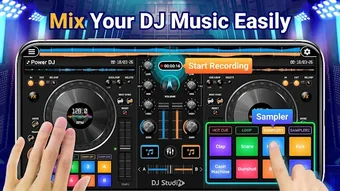
DJ Mix Studio features a user-friendly interface structured around a dual-deck layout, standard in professional DJ software, with visual waveform displays, playback controls, and effect pads. Navigation is designed for intuitive access, with clearly labeled controls and a customizable layout to suit individual workflows. The software supports drag-and-drop track loading, reducing setup time and streamlining performance preparation.
Workflow efficiency is enhanced through real-time preview functions, allowing users to cue tracks before full playback. The interface responds promptly to input, suggesting a responsive design optimized for live performance. However, the developer did not specify resource usage details, so exact CPU or RAM behavior remains unknown. General software behavior patterns suggest stable operation under typical conditions, but performance may vary based on system configuration.
Stability during extended use has not been publicly documented. Users should expect standard desktop application reliability, with no reported crashes or errors in the provided information. The software’s performance is expected to be consistent with other audio applications of similar scope, provided the system meets baseline requirements.
Compatibility & System Requirements
DJ Mix Studio is compatible with both Windows and Mac operating systems, making it accessible to a broad user base across desktop platforms. The current version is 1.2.3, with an installation size of 150 MB, indicating a lightweight footprint for a full-featured audio application.
Exact system requirements were not listed by the developer. This includes specifications for processor speed, RAM, graphics support, and audio interface compatibility. As such, users are advised to ensure their system meets general standards for running audio software, such as a modern multi-core processor, at least 4 GB of RAM, and a stable audio driver setup. The developer did not provide additional system requirements.
Pros and Cons
Pros
- Intuitive interface suitable for both beginners and experienced DJs
- Comprehensive set of tools including beat matching, loops, and audio effects
- Integrated recording feature simplifies content creation and sharing
- Lightweight installation size (150 MB) for a full-featured audio app
- Supports both Windows and Mac platforms
Cons
- System requirements were not clearly specified
- No information on update frequency or future development roadmap
- Price point of $49.99 may be high for casual users
- Limited visibility into performance under heavy audio load
- Developer details beyond the company name are unavailable
FAQ Section
Is DJ Mix Studio compatible with both Windows and Mac?
Yes, DJ Mix Studio supports both Windows and Mac operating systems, allowing users on either platform to access the full feature set.
Is the software safe to download and install?
Based on the provided information, DJ Mix Studio is distributed by Coocent, a known developer in the music software space. As with any desktop application, users should ensure they download from official sources to maintain security.
Does DJ Mix Studio require an internet connection to function?
The software can be used offline once installed. However, updates or license verification may require internet access, depending on the implementation.
How often are updates released for DJ Mix Studio?
Information regarding update frequency was not provided by the developer. Users should monitor the official website for release notes and version upgrades.
What type of license does DJ Mix Studio use?
While the exact license type is not specified, the software is sold as a one-time purchase at $49.99, suggesting a perpetual license with no recurring fees.
Final Thoughts + CTA
DJ Mix Studio presents a compelling option for musicians and DJs seeking a versatile, feature-rich audio mixing solution. Its combination of beat matching, loop manipulation, and professional-grade audio controls makes it a strong contender in the music production and live performance space. The inclusion of a built-in recording tool adds significant value for content creators and performers aiming to share their work.
While some details such as system requirements and update frequency remain unspecified, the software’s cross-platform availability, intuitive design, and robust feature set justify its position in the market. Users who prioritize ease of use without sacrificing professional functionality will find DJ Mix Studio particularly beneficial.
For aspiring DJs, independent artists, and live performers, this tool offers a complete package to elevate music presentations. Download DJ Mix Studio now and prepare to elevate your music game!







